Bringing an old BBS back to life
How I got my 1995 Remote Access 2.02 board running again in DOSBox-X, so people can call it over telnet.
I had a single zip backup of The Windows Source sitting on my NAS. No old hard drives, no CDs. This is what it took to turn that zip back into a board you can log on to, with Chris’s ANSI and RIP screens working.
I’m writing it down because a lot of it took real digging. If you’ve got an old board in a zip somewhere, I hope this saves you a few nights.
telnet your.host 2323
Want to see how it turned out? The Windows Source is live. Log in from your browser with Guest / guest, or telnet to bbs.windowssourcebbs.com.
On this page
First rule: work on a copy
Never touch the original backup. I kept the zip exactly as it came off the NAS and unpacked a working copy next to it.
Every change happened on that copy. Before I changed a config file, I saved the old one in a config-backups folder. When something broke, I could always compare against the real 1995 file.
I also tested every fix on a throwaway copy first, then copied just the changed files into the real install. Small patches, one at a time.
DOSBox-X answers the phone
Back in the day a real modem answered the calls. Now DOSBox-X pretends to be that modem. When someone telnets in, DOSBox-X makes it look like a ring and a connect to the BBS.
The board never knows the difference. It still thinks it’s talking to a modem on COM2 at 57600.
The DOSBox-X config
These are the parts that matter in my dosbox-bbs.conf:
[cpu]
core=normal
cputype=pentium
cycles=fixed 30000

[dos]
xms=true
ems=true
umb=true
ver=6.22

[serial]
serial1=disabled
serial2=modem listenport:2323
serial3=disabled
serial4=disabled

[autoexec]
mount c WINBBS
mount d drives/DRIVE_D
mount e drives/DRIVE_E
mount f drives/DRIVE_F
mount g drives/DRIVE_G
c:
RUNBBS.BAT
serial2=modem listenport:2323 is the magic line. It puts a fake modem on COM2 and listens for telnet on port 2323.
Fixed cycles keep it from eating the whole PC. 30000 is plenty for RA and the doors, and it uses about one CPU core.
The board originally had C:, D:, E:, F: and G: drives. I mount a folder for each one so the old paths in the configs still work. E: was a hard-disk copy of a CD, so I mount it as a normal writable folder, not as a CD-ROM. Doors write temp files there.
I turned the sound off too. A BBS doesn’t need a Sound Blaster.
The FOSSIL driver
RA talks to the modem through a FOSSIL driver. My board used BNU, and it was already in the backup, so I kept it.
It loads once in the batch file, locked at 57600 on COM2. In BNU, port 1 means COM2, because it counts from 0.
The modem strings
In the old setup FrontDoor answered every call and handed callers to RA. So RA’s own modem settings told the modem never to answer (S0=0).
With FrontDoor gone, RA has to answer by itself. I changed node 1’s modem init in RACONFIG to:
AT+NET1|
ATH0S0=1M0|
AT+NET1 tells the DOSBox-X modem to speak real telnet, so it handles the telnet codes properly. S0=1 answers on the first ring.
Callers get about 3 seconds of silence and then the logon screen. That’s just the fake modem “picking up.”
One node, and the autostart
The real board ran more than one node. For now I run just node 1, so it’s one caller at a time, like the old days.
Here’s my whole RUNBBS.BAT. DOSBox-X runs it at startup:
@ECHO OFF
REM single node telnet runner (DOSBox-X modem on COM2)
REM FrontDoor/FastEcho/ALLFIX are NOT run (no FidoNet).
PATH C:\DOS;C:\RA;Z:SET RA=C:\RA
SET RATEMP=C:\TEMP
SET TEMP=C:\TEMP
SET IEDIT=C:\RA
SET ICE=C:\RA\ICECHAT
SET DSZLOG=C:\TEMP\DSZ.LOG
C:\RA\BNU.COM /L1:57600
:START
CD \RA\NODE1
C:\RA\RA.EXE -N1
IF ERRORLEVEL 255 GOTO END
GOTO START
:END
RA runs, takes a call, and exits when the caller hangs up. The loop starts it right back up for the next caller.
On the Windows side, a small start-bbs.bat opens DOSBox-X minimized with that config. A Task Scheduler job runs it at log on. Run it as the logged-in user, not as a service, because DOSBox-X needs a desktop.
I also added a Windows Firewall rule for port 2323 that only allows the DOSBox-X program.
Turn off the FidoNet stuff
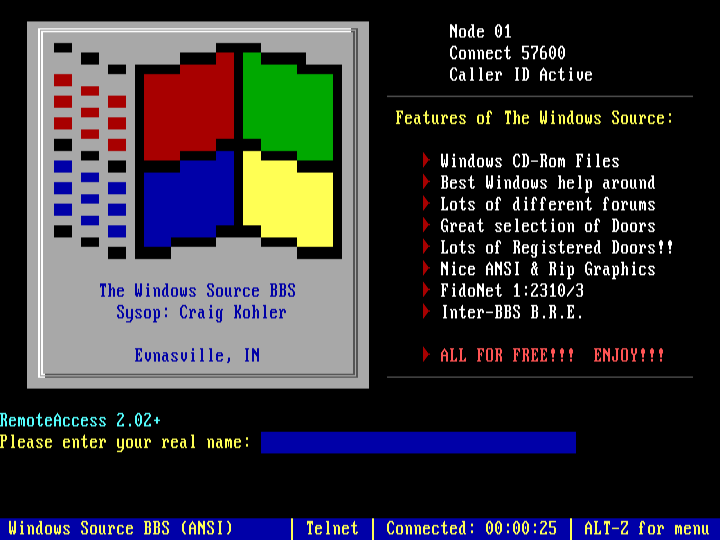
My board was FidoNet node 1:2310/3. FrontDoor was the mailer, FastEcho tossed the echomail, and ALLFIX handled file echoes.
All of that is dead now. My old hub is long gone, and I didn’t want anything trying to dial out or poll somebody.
So the new batch file simply doesn’t run any of it. No FrontDoor, no FastEcho, no ALLFIX, no BRE mail runs. The old batch files are still on the drive, they just never get called.
I also emptied the outbound mail folders, so nothing is sitting there waiting to go out.
The nice part: FrontDoor used to sit in front of RA and answer the phone. Once you take it out, RA answers on its own (see the modem strings above).
Calling in with SyncTERM
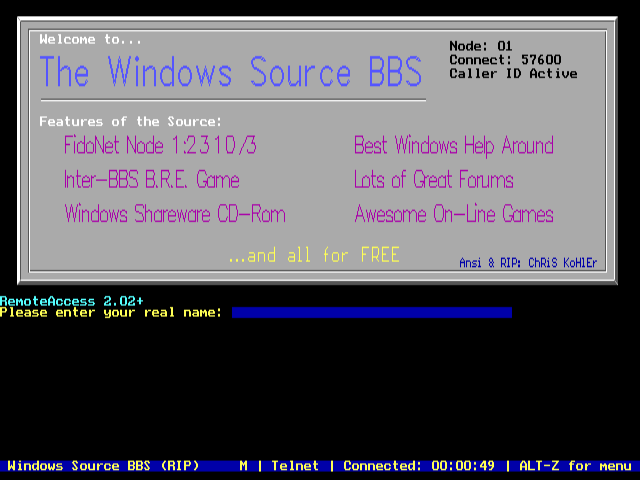
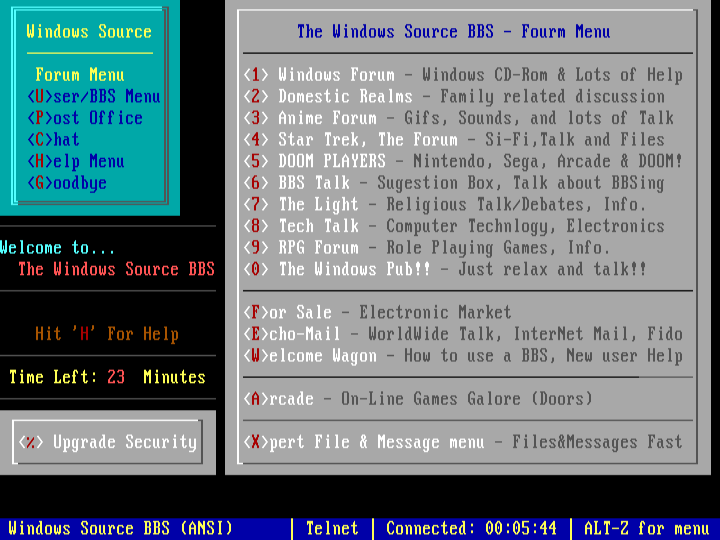
Regular telnet will connect, but you won’t see the art right. Use SyncTERM. It’s free, runs on Windows, Mac and Linux, and does both ANSI and RIP.
I set up two entries in the dialing directory, both pointing at the same address:
- ANSI entry
- Connection Type: Telnet · Port: 2323 · Screen Mode: 80x25 (VGA)
- RIP entry
- Connection Type: Telnet · Port: 2323 · Screen Mode: EGA 80x25 · RIP: RIPv1
RIP needs the EGA 640x350 mode. If you leave it on VGA, you only get the ANSI screens.
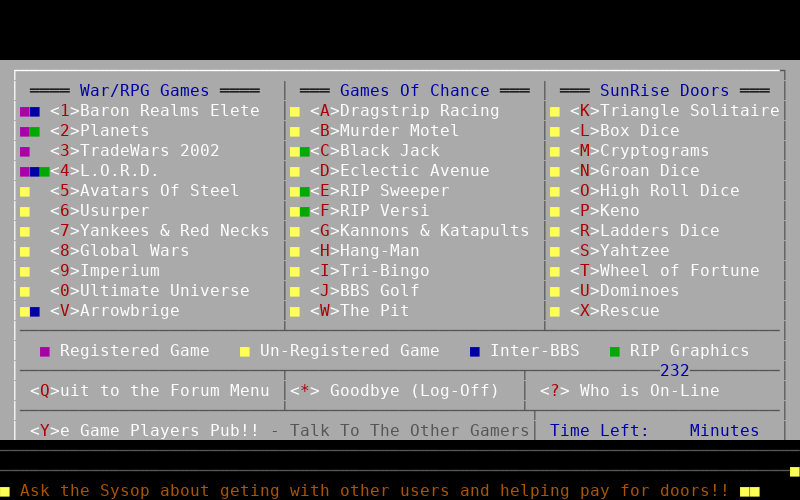
RA figures out if you have RIP on its own. On the RIP entry you get Chris’s RIP welcome screen, and the buttons work with the mouse.
On a Mac, the first time you open SyncTERM it may say it can’t check the developer. Go to System Settings, Privacy & Security, and click Open Anyway. Or right-click the app and pick Open.
Cleaning out private data
This is the part I cared about most. The old user file had real names, addresses, phone numbers and birthdays of hundreds of local callers from the 90s. None of that should ever go online.
But I didn’t want to wipe the accounts either. If you open a message board, you should still see who posted what, under the name they used back then.
So the plan was: keep every account and every public post, blank the private stuff, and lock the accounts.
Before anything: a private backup
I made a full copy of the original user, message and door files into a private folder that never goes into the install. That’s what I check claims against later.
USERS.BBS
All 773 records stayed, in the same order. That matters, because other files point at users by record number. Afterward I rebuilt the index files (USERSIDX.BBS and USERSXI.BBS) to match.
On every old account except mine and Chris’s, I:
- Replaced the real name with the caller’s own handle, where they were different
- Blanked all three address lines
- Blanked the data and voice phone numbers
- Blanked the birth date
- Blanked the sysop comment field (my old notes on people)
- Wiped the password (set it to the CRC of an empty password)
- Set security to 0, which locks the account
- Zeroed the extended USERSXI record
I kept the handle, the city and state, and all the stats: first and last call, number of calls, messages posted, uploads and downloads, and time used. That’s the fun history, and it isn’t private.
Chris and I got new passwords. His account is his real one from back then, handle ChRiS KoHlEr, at his old access level.
The message base
The rule was simple. Private mail goes. Public posts stay, with their original From, To and Subject.
- Deleted private messages, netmail, the Post Office board and the FidoNet/InterNet mail board
- Kept every public forum and echo post, and checked From, To and Subject field by field against the original
- Zeroed private phone numbers that people had typed inside their posts
- Cleared reply links that pointed at deleted messages
- Rebuilt the Hudson index files (MSGHDR, MSGIDX, MSGTOIDX, MSGINFO) and packed MSGTXT
Everything else
Private data hides in a lot of places on an old BBS. I went through:
- FidoNet .MSG netmail and the mailer’s in/out history files
- File attaches, offline mail packets and outbound folders
- Call logs, the last-caller file and the who’s-online file
- A log of failed password attempts (yes, it saved what people typed)
- New-user questionnaire answers and door “business card” files
- Door game player files and score lists
For door and data files, I swapped real names for that person’s handle in place, keeping each file the same length. That way the doors still read their files, and the player lists match the handles in the user file.
I left program files, vendor docs and FidoNet nodelists alone. The nodelists only list public BBS numbers.
Scan, then scan again
Last step: a scan of every file in the install, comparing against the private originals. It looks for real names, phone numbers, addresses, birth dates and passwords, and only prints counts and file names.
It found a few things I’d missed, like a real name in the uploader field of a file list. I fixed those and scanned again. Every remaining hit had a reason, like a public BBS number in a nodelist.
Old names are locked, and you can claim yours
If a new caller types an old name, RA finds the locked record and shows a LOCKOUT screen instead of asking for a password. I made ANSI, RIP and plain text versions.
The screen says the account is from the 90s and can be claimed at windowssourcebbs.com/claim. Then it hangs up. The caller can call back and sign up under a new name.
I also tweaked two lines in ENGLISH.RAL so the “Incorrect password” and “Access denied” messages point to the claim page. I kept each line the exact same length so the language file didn’t break.
The claim page goes to a private queue that only I see. I compare what the person remembers with the private backup. If it lines up, I give the account a new password and its old access level back. Nothing is automatic.
Filling the file areas
The backup had the file area setup and descriptions, but not the files. Those lived on drives I don’t have anymore.
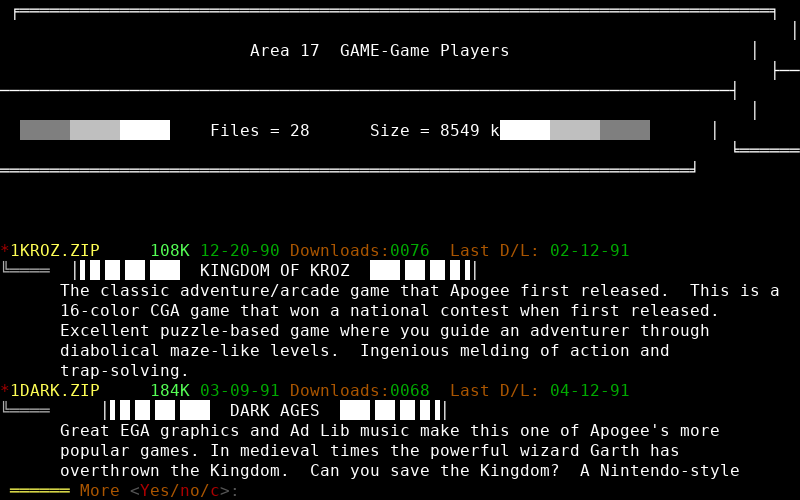
An empty file section isn’t much fun to call. So I filled the areas with real files from the period, about 780 MB worth.
- A 1993 Windows shareware CD-ROM from archive.org became my E: drive, a lot like the CD the board had back then
- Other areas got files from 1990–1995 BBS shareware collections on archive.org
- Games got the classic shareware episodes, like Kingdom of Kroz, Commander Keen, Wolfenstein 3D and Doom
- The FidoNet areas got public FidoNews issues and nodelists
- The sysop area got the archivers RA needs: PKZIP 2.04g, ARJ, LHA and ZOO
I only kept a file if its own docs said shareware, freeware, public domain or ASP. Anything that looked like warez, cracks or adult stuff was out.
Then I built new file database entries (the FDB files in RA\FILELST) for the filled areas. I did not touch area 1. That one held real user uploads, so it stays offline.
One heads-up: new users start at security 10, just like 1996. On my board that meant no downloads until the sysop raised you. Decide what level new callers should get.
Gotchas I hit
These all made me scratch my head. Here’s what each one looked like and what fixed it.
Messages look empty (lastread pointers)
I logged on and the boards said “no new messages.” The posts were there. The board just thought I’d already read them.
My last-read pointers in LASTREAD.BBS were still at the old 1990s numbers. After the message base was packed and renumbered, they pointed past the end.
The fix was to reset my record’s pointers to 0. In RA 2.02 each user gets 200 boards of 2 bytes each, in user record order. Nobody else’s pointers changed.
To read any board from the start: R (Read), then F (Forward), then type 1.
The JAM flag on Hudson boards
Four boards still looked empty even though they had real Hudson messages in them.
In MESSAGES.RA those boards had the JAM flag set (bit 7 of the attribute byte). So RA looked for a JAM base, found nothing, and showed nothing.
Clearing that one bit brought their messages right back.
Archive view lists 0 files (PATH)
The V command (view inside an archive) found the file but said it had 0 entries. Every archive, every time.
The viewer calls PKUNZIP, ARJ and LHA by name. My batch file didn’t set a PATH, so it couldn’t find them. Adding this line at the top of RUNBBS.BAT fixed it:
PATH C:\DOS;C:\RA;Z:\
Usurper quits right away (the /P path)
Usurper would start and drop you straight back to the menu. It looked like it wasn’t getting a door file.
It was actually a typo in MULTI.BAT from 1995. It said /P:C:\RA\NODE1. Usurper wants no colon after /P:
Usurper /N1 /PC:\RA\NODE1
I fixed it for all three nodes.
An orphan echomail board
One board number held 243 echomail messages from 1994–95, but it had no name, so nobody could find it.
I named it “FIDO-Echomail Archive 94/95,” cleared its JAM flag and made it read-only. It ended up holding most of the old public messages that survived.
Legacy names and new callers
With old accounts kept, a new caller could type an old name and get asked for a password they don’t have.
Setting those accounts to security 0 makes RA show the LOCKOUT screen without asking for a password, and then hang up. Make sure that screen tells people what to do next.
A couple of smaller ones
- RA wants C:\TEMP to exist, because the batch file points TEMP there
- The privacy cleanup zeroed the board’s own phone number (812-476-4534) in a few screens, because it matched a number in the user file. I put just those digits back.
- New-user signup wants the birth date with dashes, like 01-01-70
- Telnet isn’t encrypted. Don’t reuse a password you care about.
Where did all the messages go?
This one hurt. The board took 23,614 calls, and my callers posted 9,069 messages. Only 772 messages were in the backup, and just 305 of those were public posts.
FastEcho’s own stats file told the real story. From February 1994 to January 1996 it tossed about 330,000 echomail messages into the board. The Star Trek echo alone was about 71,500.
There were two reasons they were gone:
- The JAM folder wasn’t in the backup. The echo areas lived in a separate JAM message folder, C:\RA\JAM. It was empty in the zip. The zip was made later from a copy that didn’t include it.
- My own nightly cleanup. The nightly event ran RAMSG PACK with -PURGE and -DELETE. The board settings deleted echo messages after 1 day and local posts after 45 days. So even on a good day, only the newest posts were ever on disk.
If you’re still running a board today: back up the whole message folder, JAM and all, and think about how long you really want to keep posts.
If you’re reviving one: look for every copy you can find before you start. Old drives, CD-Rs, floppies. Public FidoNet echo archives might also have some of the same traffic.
Checklist
- Keep the original backup untouched. Work on a copy, and save every config before you change it.
- Write an inventory first: what’s there, what’s missing, what has private data.
- Set up DOSBox-X with
serial2=modem listenport:2323(or whatever COM port your board used) and fixed cycles. - Mount a folder for every drive letter the configs expect.
- Load your FOSSIL (BNU or X00) in the startup batch file, locked to the right port and speed.
- Change RA’s modem init so it answers on its own:
AT+NET1andS0=1. - Write a batch file that loops RA, and set PATH so it can find your archivers.
- Don’t run the mailer, tosser or file echo programs. Empty the outbound folders.
- Back up the private originals somewhere that never goes online.
- Scrub USERS.BBS: blank addresses, phones, birth dates, comments and passwords. Keep handles and stats. Lock old accounts with security 0.
- Delete private mail and netmail. Keep public posts with their original authors.
- Check door files, logs, last-caller files, questionnaires and offline mail folders too.
- Run a PII scan on everything. Fix what it finds. Scan again.
- Make a LOCKOUT screen that tells old callers how to claim their account.
- Check MESSAGES.RA for the JAM flag on boards that really hold Hudson messages.
- Reset lastread pointers if the boards look empty.
- Check door batch files for old typos, like the Usurper /P path.
- Fill empty file areas only with files that say shareware, freeware or public domain.
- Pick the security level for new callers.
- Test with SyncTERM in both VGA (ANSI) and EGA (RIP) modes.
- Test on a throwaway copy, then patch the real install one small step at a time.
- Telnet isn’t encrypted. Think before you open the port to the internet.
Questions, or reviving your own board? Find me at craigkohler.com. And if you called The Windows Source back then, claim your old account.